
JobTrackerRun every job, from the sale to payday→
Run the work
Get paid and pay people
RankLockerGet found, and see what it brings in→
Get found
Know what's working
For agencies
WeekendCRMAnswer every lead, even on the weekend→
Get the review
Software · JobTracker · Scheduling and dispatch
JobTracker
Scheduling and dispatch
Contractor scheduling software that catches conflicts before your crew does
Scheduling and dispatch in JobTracker is a contractor scheduling calendar, Crew Board and live crew map tied to every job. Office managers see each crew's capacity and catch double-bookings, time off and subcontractor conflicts before booking, with 16 days of weather on every view. When one phase slips, the rest of the schedule moves in one step, and everyone gets one combined update.
Every screen in English and Spanish · Works on phone, tablet and desktop · Plans start at $495 a month
The problem
Sound familiar?
Why does one rained-out day wreck the whole week's schedule?
Because the schedule lives on a whiteboard, two calendars and a group text. Move one job and you have to call the crew, the sub, the customer and the supplier, then hope nobody else booked that crew already. Someone always finds out on the morning of, standing in a driveway.
If you're the one holding the schedule, you never really clock out. Sunday nights go to rebuilding Monday, and every phone call starts with "are we still on?" Scheduling should be a few minutes of drag and drop, not the job that eats your whole week.
Where it costs you today:
two crews sent to one job while another job sits empty
a tech booked on a day their vacation was already approved
an hour of phone calls to move one phase by one day
What it does
Run the work
What does scheduling and dispatch in JobTracker do?
One calendar, five ways to read it
Switch between Day, Week, Month, List and Timeline views, full screen if you want, colored by job. Rain, heat, wind and UV for the next 16 days show on every view.
Plan the week by crew
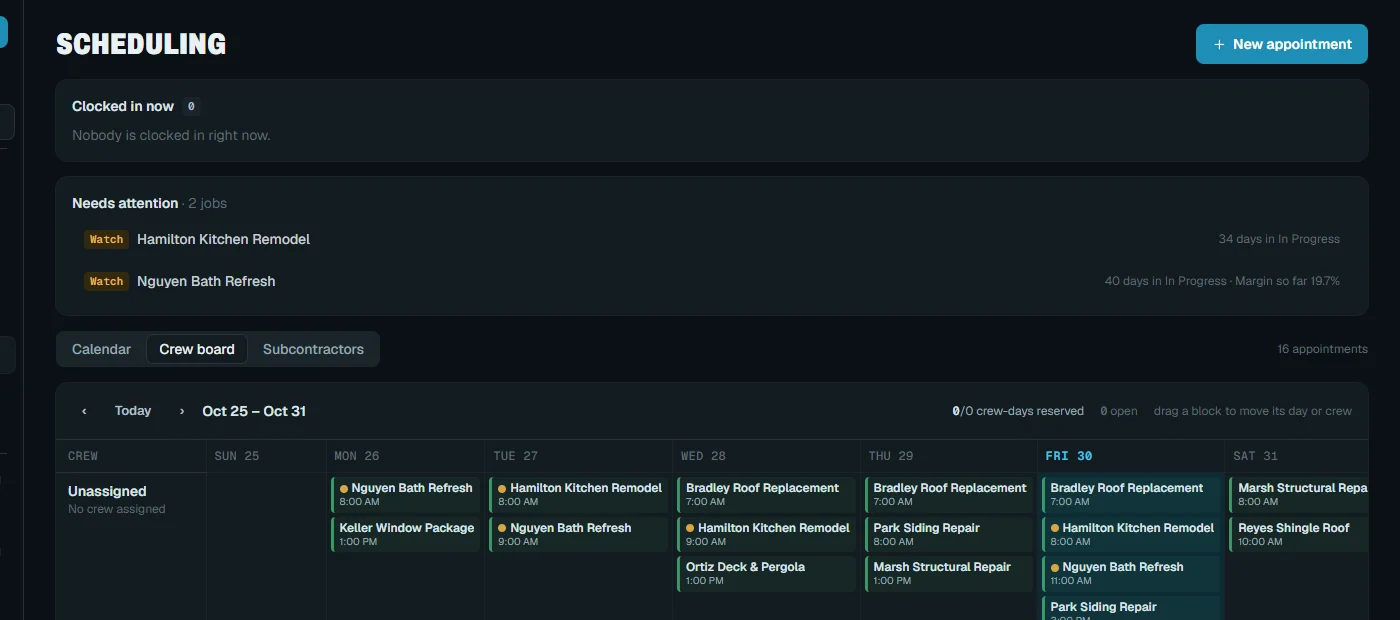
The Crew Board puts crews in rows and days in columns. Drag work into place, see each crew's capacity, and watch overbooked days turn red before anyone is overloaded.
Conflicts flagged before you book
Equipment can't be double-booked, and people and subs are flagged. Approved time off blocks booking, and each person's personal conflict calendars count as busy.
Move one visit or everything after
Shift a phase and choose to move everything after it, only what it runs into, or just that one. Linked visits stay together, and everyone gets one combined update.
Customers who expect you
Customers get branded confirmations, day-before reminders and one combined message for multi-day bookings. A customer-needed flag on each visit tells them when someone has to be home.
See where every crew is now
A live map shows clocked-in crew, trucks and equipment, and route replay shows where a vehicle went on any day. Crews clock in to the right job automatically when they arrive on site.
In the app
Real screen
See it in JobTracker.
This is the actual screen your team works in, shown here with demo company data.
JobTracker · Scheduling and dispatch
With JobTracker
What changes
What changes when the whole schedule is on one board?
Friday afternoon you drag next week onto the Crew Board. Wednesday turns red for one crew, so you slide a visit to the crew that has room.
Rain shows up in Tuesday's forecast. You push the exterior phase, choose to move only what it runs into, and the rest of the week stays put.
Crew, subs and customers get one combined update instead of five phone calls. Customers tap to confirm the new day or ask for another time.
Mid-morning a customer asks where the crew is. You open the live map, see the truck a few streets away, and answer while they're still on the line.
If nothing changes
A schedule kept in one person's head breaks the day that person is out. Until the schedule lives in one place, every slip costs a morning of phone calls and some of your customers' patience.
The plan
Three steps
How do you get started?
1
Book a demo.
Thirty minutes, on work like yours.
2
We set it up with you.
We bring in your jobs, people and data, and train your crew in English or Spanish.
3
Run your next job in it.
See the difference on day one.
Works with
One system
Part of JobTracker, connected to everything else.
Run the field
Field service management software →
Run the field
Time clock and time tracking app →
Run the field
Fleet management software →
See how it all fits together in JobTracker, our job management software for contractors →
FAQ
Straight answers
Questions about scheduling and dispatch.
Does it sync with Google Calendar?
Yes. Each person's appointments publish to their own Google calendar, and their personal conflict calendars count as busy when you book them. Everyone keeps working from the calendar they already check, and the office still sees the whole company in one place.
Can I schedule subcontractors in the same calendar?
Yes. Subs are flagged on conflicts, and their working days and hours can warn you or block a booking. You choose which of a sub's logins get scheduling emails through the subcontractor portal.
What happens if I try to book someone who's on vacation?
It won't go through. Approved time off blocks scheduling for that person and adds a block to the calendar, so nobody gets booked on a day they're off. Employees request time off in the app, and managers approve or decline it.
How do customers know whether they need to be home?
The customer-needed flag tells them. It's set per visit and shows on crew invites, customer messages and the portal, and the On My Way text can go out automatically by GPS distance.
Can I see if we're overbooked next week?
Yes. The Crew Board shows each crew's capacity and turns overbooked days red. Over time, Insights tracks crew utilization, backlog and schedule accuracy, so you can see whether your estimates hold up.
How much does it cost?
Plans start at $495 a month, with a discount for paying yearly. Book a demo and we'll lay out a week like yours on the Crew Board so you can see it working. Bring the week that gave you the most trouble lately.
Get started
30-minute demo
Get your Sunday nights back from the schedule
Book a demo and we'll put a week like yours on the Crew Board, with conflicts, weather and crews all in view.