
JobTrackerRun every job, from the sale to payday→
Run the work
Get paid and pay people
RankLockerGet found, and see what it brings in→
Get found
Know what's working
For agencies
WeekendCRMAnswer every lead, even on the weekend→
Get the review
JobTracker
Job management software for contractors
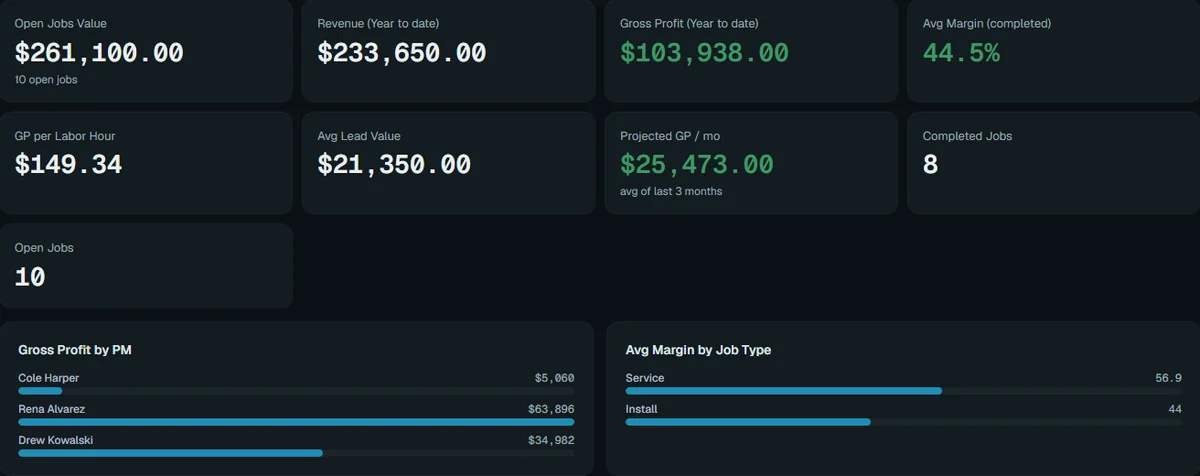
Know every job is making money while you can still do something about it.
JobTracker is job management software for home-services and construction companies. It runs the whole life of a job in one place: the sale, the schedule, the crew, materials, permits, subcontractors, job costing, customer updates, invoicing and commissions. You see the real profit on every job while it's still running, in English or Spanish, on any device.
Built inside working trades companies · Every screen in English and Spanish · Plans start at $495 a month
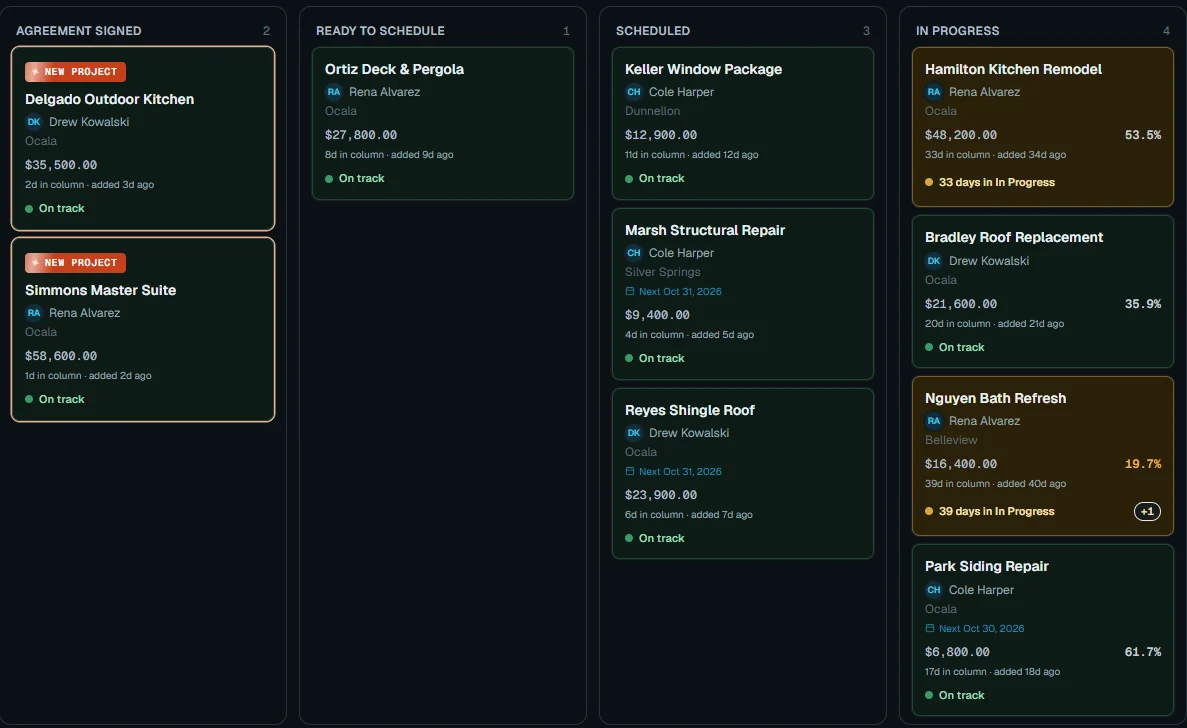
JobTracker · Job board
Search jobs, customers, tasks…
The problem
Sound familiar?
Why do you only find out a job lost money after it's finished?
Because the job lives in five places. The lead is in the CRM, the schedule is on a calendar, the crew gets a group text, costs sit in a spreadsheet nobody updates, and receipts ride around in a truck. Nothing talks to anything else.
So you become the system. You're the one who remembers which customer is waiting on a callback, which sub's insurance ran out, and which job is quietly slipping. You lie awake doing the math the software should have done.
Meanwhile the margin leaks out in small, quiet ways:
a change order that never got signed
a crew clocked to the wrong job all week
a sub bill paid before anyone checked it
a permit sitting at the county for three weeks
a customer calling the office for the fourth time to ask "when?"
You didn't start a company to babysit software that doesn't talk to itself.
Who built it
From the field
Built by people who sell and build for a living.
We spent years teaching trades companies how to sell, and kept watching good companies lose money in the gaps after the sale: the handoff to the office, the schedule, the crew, the costs, the payday. JobTracker was built inside working remodeling and repair companies to close those gaps, one real problem at a time.
Every screen, portal, email and text in English or Spanish, picked per person
Customer and subcontractor portals included, under your brand
135 help articles kept current with every feature
A full security review finished in October 2026, every finding fixed
“I spent years teaching trades companies how to sell. The sale was never the hard part. Keeping everything straight after the customer said yes was. So we built the system I wish every one of those owners had.”
Shawn Derrick
Founder, Legacy Builder Applications
The plan
Three steps
How do you get from five apps to one?
1
Book a demo.
Thirty minutes, on work like yours. Bring the job that keeps you up at night.
2
We set it up with you.
We import your customers, jobs and subs, connect GoHighLevel and your books, and train your crew in English or Spanish.
3
Run your next job in it.
See the profit on day one, not three weeks after it's done.
What's inside
22 tools, one system
Everything a job needs, in one place. Start where it hurts.
Each tool works on its own. Together they're one system, so nothing gets typed twice.
3 tools
Sell the job
Close it at the kitchen table.
7 tools
Run the work
Every job, every phase, one board.
5 tools
Run the field
Crews, trucks and hours, tracked.
4 tools
Get paid and pay people
Money in, bills out, profit live.
3 tools
Lead the company
Know what needs you today.
With JobTracker
A normal day
What does a normal Tuesday look like with JobTracker?
6:45 a.m. Your crew opens My Day on their phones, in Spanish. Today's visits, gate codes, the scope and the photos they owe you are already there.
8:10 a.m. A crew member arrives on site and is clocked in to the right job automatically.
10:30 a.m. The homeowner approves a change order from their portal. It's added to the job's value and budget before lunch.
1:15 p.m. A sub uploads a new insurance certificate. Nobody in the office had to chase it.
3:40 p.m. A supplier bill comes in. The PM approves it from their phone; payables pays it.
5:30 p.m. The end-of-day email lands: hours, costs, late starts and the margin on every open job.
You go home knowing which jobs made money today. Nobody had to call you to find out.
The choice
Where this goes
What does another season of “we'll figure it out” cost?
Without one system
Another job closes a few points under where you bid it, and you find out in the books a month later. Commission fights on payday. A crew double-booked because two people kept two calendars. Customers calling the office for updates you don't have.
With JobTracker
You start every morning knowing which jobs are making money and what needs you. The crew knows what to do, customers know where things stand, and payday is right the first time.
Pricing
See it first
See it on your own work before you decide.
Plans start at $495 a month, with a discount when you pay yearly. We set it up with you, import your customers, jobs and subs, and train your crew. Start with the part that hurts most and turn on the rest when you're ready.
Integrations
Keep what works
Keep GoHighLevel, QuickBooks and the tools you already trust.

GoHighLevel

QuickBooks Online

Wave
Gusto
Stripe
Google Calendar
Google Drive
Claude
ChatGPT
n8n
FAQ
Straight answers
What owners ask before they switch.
Will my crew actually use it?
Yes, because it's built for a phone and for the way crews work. My Day shows only today's visits, the scope and the photos they owe you, in English or Spanish, and clocking in can happen automatically when they arrive on site.
Do I have to switch everything at once?
No. Start with the part that hurts most, like scheduling or job costing, and turn on the rest when you're ready. Menu access is set per person, so each role only sees what it needs.
Can I keep GoHighLevel and QuickBooks?
Yes. Signed contracts and won deals in GoHighLevel become jobs automatically, and job costs post to QuickBooks Online. Wave is supported too.
How much does JobTracker cost?
Plans start at $495 a month, with a discount for paying yearly. Book a demo and we'll match the plan to the size of your team.
How does it know my real profit?
Labor posts at each person's actual pay rate as they clock in. Sub bills, materials, equipment time and permit fees post as they happen, and signed change orders add to the job's value and budget.
Can I hide costs and margins from my crew?
Yes. The "see financials" permission hides cost, margin and pay from anyone who shouldn't see them.
Will AI ever text my customers on its own?
No. The AI Assistant reads back every action and waits for your yes, and any text or email to a customer through the AI connection waits for a person on your team to approve it.
Can I run more than one company?
Yes. One login covers every business you own, with a switcher between them.

Get started
30-minute demo
See your jobs running in JobTracker.
Book a 30-minute demo on work like yours. Bring the job that keeps you up at night.