
JobTrackerRun every job, from the sale to payday→
Run the work
Get paid and pay people
RankLockerGet found, and see what it brings in→
Get found
Know what's working
For agencies
WeekendCRMAnswer every lead, even on the weekend→
Get the review
Software · JobTracker · Job management
JobTracker
Job management
Job management software that shows which jobs need you today
Job management in JobTracker is one place to run every job for home-services and construction companies, from the first build-out step to the final payment. Each job carries its schedule, tasks, photos, customer file and live profit, and its card turns green, yellow or red by rules you set. Crews work from their phones in English or Spanish, and customers follow a live tracker.
Every screen in English and Spanish · Works on phone, tablet and desktop · Plans start at $495 a month
The problem
Sound familiar?
Why does it take five phone calls to find out how one job is going?
Because the job is scattered. The schedule lives on one calendar, the scope sits in an email, photos are on a foreman's phone, the gate code is in a text thread, and costs are in a spreadsheet someone updates on Fridays. To answer one question about one job, you call three people and hope one of them knows.
So you carry the whole company in your head. You remember which job is behind, which customer is waiting on a proof, and which crew forgot the photos. When you take a day off, things slip. That isn't a people problem. It's a system problem, and it's costing you margin you never see leave.
Where it costs you today:
a job sitting in the same stage for weeks with nobody noticing
crews driving back to a site because nobody wrote down the gate code
cost overruns found in the books a month after the job closed
What it does
Run the work
What does job management in JobTracker do?
A job board that points at problems
Every job moves across a board by stage. Each card turns green, yellow or red from rules you set per column, such as actual margin, cost against budget and days in stage.
New jobs set up the same way
A new job opens a step-by-step build-out covering team, schedule and phases, materials, budget and tasks. Click Launch and everything lands in the right tabs, the same way every time.
Real profit while the job runs
The Financials tab shows budget, costs and profit by group, committed and pending costs, projected final cost, and cash collected against what's been spent. Labor posts at each person's real pay rate.
The whole customer in one file
Gate codes, pets, parking notes, documents, photos, invoices and every past job sit on the customer record. Change a phone number once and every one of their jobs updates.
Today's work on the crew's phone
My Day shows today's visits, site access, checklists, required photos, clock-in and tasks on one screen. A phase can't be marked done until its required photos are in.
Customers check a tracker, not your phone
Each customer gets a portal branded with your company, showing a live timeline of every phase, the photos you choose to share, approvals in writing and online invoice payment.
In the app
Real screen
See it in JobTracker.
This is the actual screen your team works in, shown here with demo company data.
JobTracker · Job management
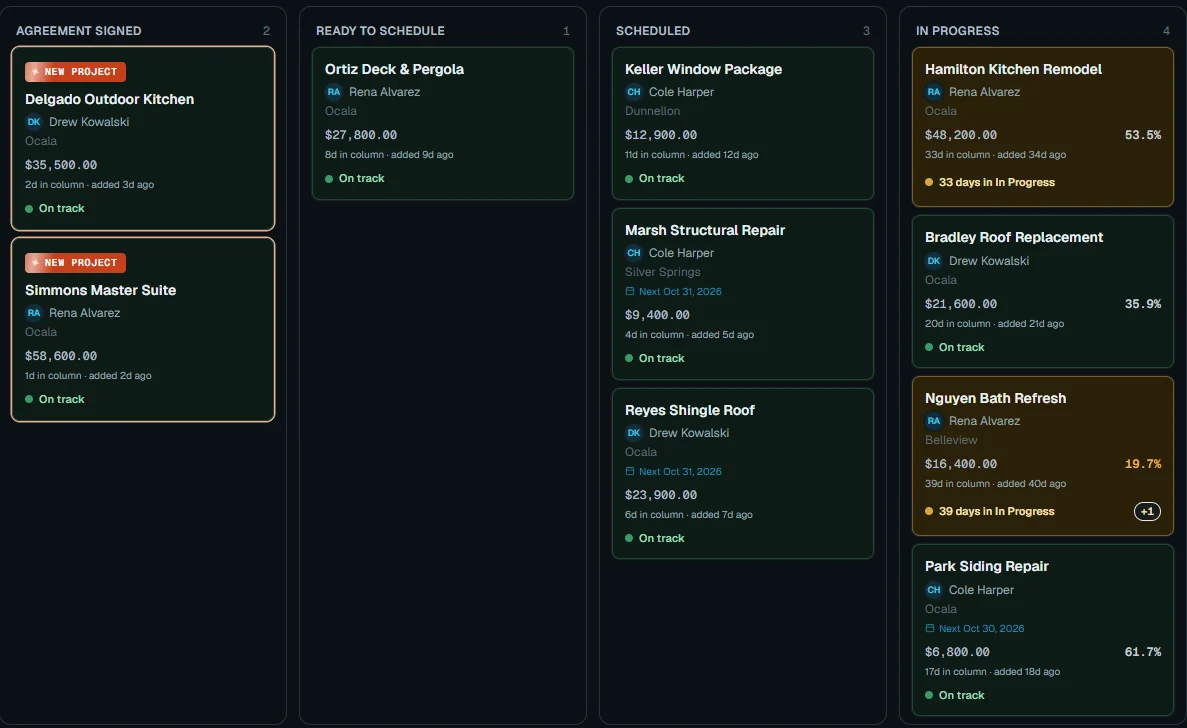
With JobTracker
What changes
What changes when every job lives in one place?
Monday morning you open the board. Two cards are yellow and one is red, and each one shows the reason before you make a single call.
A signed job comes in and opens its build-out. You pick the team, phases, materials and budget, click Launch, and the job is ready to schedule.
On site, the foreman checks My Day for the gate code and the photos this phase needs. The phase won't close until they're uploaded.
The homeowner opens the portal, sees the phase marked complete, and approves the next design proof. Your phone stays quiet, and the Financials tab shows the margin holding.
If nothing changes
Every week a job runs without a clear view, small problems stack up quietly. A missed photo, a stalled stage or a cost overrun is cheap to fix today and expensive to find after the job closes.
The plan
Three steps
How do you get started?
1
Book a demo.
Thirty minutes, on work like yours.
2
We set it up with you.
We bring in your jobs, people and data, and train your crew in English or Spanish.
3
Run your next job in it.
See the difference on day one.
Works with
One system
Part of JobTracker, connected to everything else.
Get paid and pay people
Job costing software →
Run the work
Scheduling and dispatch software →
Get paid and pay people
Customer portal and communication →
See how it all fits together in JobTracker, our job management software for contractors →
FAQ
Straight answers
Questions about job management.
Is JobTracker built for my kind of company?
Yes, if you run a home-services or construction company. It was built inside working remodeling and repair companies, and it fits roofers, cleaners, landscapers and pool companies too. Recurring jobs repeat daily, weekly, monthly, quarterly or yearly, and each repeat resets its checklist.
Can I track details that are unique to my business?
Yes. You can add custom fields in 11 types, such as dollar amounts, links and file uploads, to the job, permit or customer record. Tasks take their own custom fields too, and any task setup can be saved as a template.
Does job management include scheduling?
Yes. Every job's phases go on a calendar with Day, Week, Month, List and Timeline views, plus a Crew Board and a Plan Gantt. Weather for the next 16 days shows on every view, and shifting one phase can move the rest of the schedule with it.
Can I keep costs and margins away from my crew?
Yes. The "see financials" permission hides cost, margin and pay from anyone who shouldn't see them, and menu access is set per person. Your crew sees the work they need to do, not the numbers behind it.
Do I have to retype all my old jobs?
No. Leads, jobs and subcontractors import from CSV files using downloadable templates, and we set it up with you. Signed contracts and won deals in GoHighLevel become jobs automatically from then on.
How much does JobTracker cost?
Plans start at $495 a month, with a discount when you pay yearly. Book a demo and we'll walk through a few of your jobs and match the plan to the size of your team.
Get started
30-minute demo
See every job's health and profit in one place
Book a demo and bring the job you worry about most. We'll run it through JobTracker with you, start to finish.