
JobTrackerRun every job, from the sale to payday→
Run the work
Get paid and pay people
RankLockerGet found, and see what it brings in→
Get found
Know what's working
For agencies
WeekendCRMAnswer every lead, even on the weekend→
Get the review
Software · JobTracker · Permit tracking
JobTracker
Permit tracking
Permit tracking software that shows where every permit is stuck
Permit tracking in JobTracker is a permitting board for contractors that follows every permit and engineering job from applied to approved. Each permit is tied to its job, its authority and its fees, which post to job costs automatically. Turnaround history by authority shows how long each office really takes, and PMs get an email whenever a permit changes status.
Every screen in English and Spanish · Works on phone, tablet and desktop · Plans start at $495 a month
The problem
Sound familiar?
How many of your jobs are waiting on a permit right now?
If you have to check a spreadsheet, a portal login and three email threads to answer that, you're not alone. Permits get submitted and forgotten. Engineering waits on a stamp nobody followed up on. The crew is booked for Monday, and on Friday you learn the permit is still sitting at the county.
Then you're the one calling the homeowner to explain a delay you didn't cause and couldn't see coming. You guessed at the timeline because you had no history to go on. The permit office isn't what hurts most. Not knowing until it's too late to plan around it is.
Where it costs you today:
crews booked for work the permit office hasn't approved yet
permit and engineering fees that never make it onto the job cost
timelines promised to customers with no history behind them
What it does
Run the work
What does permit tracking in JobTracker do?
Every permit on one board
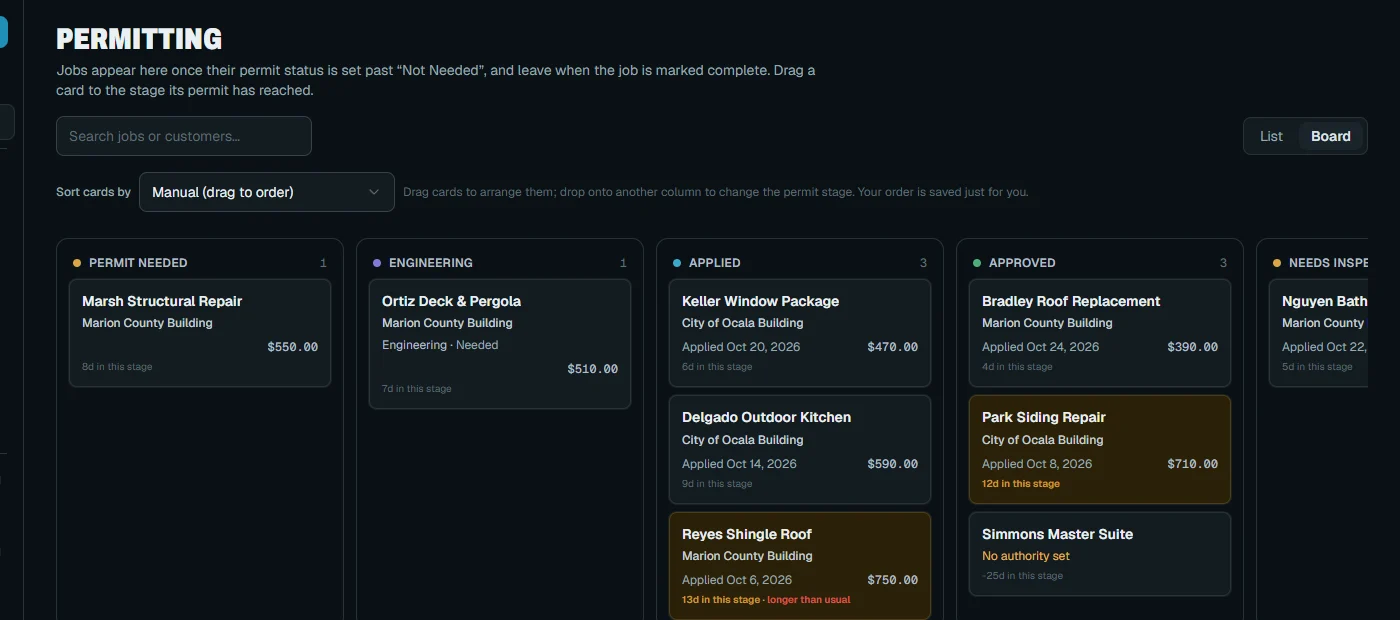
A Kanban board gives each stage its own column, including Engineering. Days-in-stage and aging alerts make a stalled permit stand out before it holds up the job.
The right office from the address
Your authority directory covers offices by city, ZIP or county, and JobTracker suggests the right one from the job address. No more guessing which office has the job.
Turnaround history by authority
See typical and slowest days from Applied to Approved, the inspection pass rate, and which permits are running long right now, for each authority you work with. Set customer expectations from real history, not a hopeful guess.
Engineering tracked like a permit
Track the engineering firm, type, status and cost on each job, plus private inspectors. Nothing waits on a forgotten stamp because nobody knew who had it.
Fees post to the job
Permit and engineering fees post to job costs automatically and show in the job's Financials tab, so the margin you see includes what the permit actually cost.
Status emails and daily answers
PMs get an email when a permit moves. Insights breaks permits down by authority, and AI business insights point out what needs attention, with the number behind each finding.
In the app
Real screen
See it in JobTracker.
This is the actual screen your team works in, shown here with demo company data.
JobTracker · Permit tracking
With JobTracker
What changes
What changes when every permit has a clock on it?
A new job comes in, and its address suggests the county office. The permit card lands in the first column of the board, ready to work.
Thursday morning a card flags for aging in review. You call the office that day, not the day before the crew shows up.
A homeowner asks how long approval takes. You quote the typical days for that authority from your own permit history, and the answer holds up.
The permit is approved and the PM gets the status email. The fee is already on the job's costs, and the crew is confirmed for Monday.
If nothing changes
A permit you can't see is a delay you can't plan around. Every week it sits unnoticed pushes back a crew, wears down a customer's patience and moves the day you get paid.
The plan
Three steps
How do you get started?
1
Book a demo.
Thirty minutes, on work like yours.
2
We set it up with you.
We bring in your jobs, people and data, and train your crew in English or Spanish.
3
Run your next job in it.
See the difference on day one.
Works with
One system
Part of JobTracker, connected to everything else.
Run the work
Construction project management software →
Get paid and pay people
Job costing software →
Lead the company
Contractor KPI dashboard and insights →
See how it all fits together in JobTracker, our job management software for contractors →
FAQ
Straight answers
Questions about permit tracking.
Does JobTracker submit permits for me?
No. You still apply with the authority. JobTracker tracks every permit from there, with its stage, days-in-stage, fees and status emails, and it builds turnaround history for each office as you go. It replaces the spreadsheet, not the permit office.
Where does the turnaround data come from?
It comes from your own permits. As permits move from Applied to Approved, JobTracker records the days for each authority and shows typical and slowest times, plus the inspection pass rate. Every permit you close adds to that history, so your quotes to customers rest on real numbers.
Can I track engineering and private inspectors?
Yes. Engineering has its own stage on the board, with the firm, type, status and cost tracked on each job. Private inspectors are tracked right alongside the permit, and engineering shows up in Insights too, so slow stamps appear in your reports instead of living in your memory.
Will it warn me before I schedule work without a permit?
Yes. Production readiness runs a checklist before you confirm a job and warns you when permits or materials aren't ready, so crews don't show up to work that can't start. You find the gap at the office, not in the customer's driveway.
Can I add my own fields to permits?
Yes. Permits take custom fields just like jobs and customers do, with 11 field types to pick from. Add permit numbers, portal links, uploaded plans or whatever your offices ask for.
How much does it cost?
Plans start at $495 a month, with a discount when you pay yearly. Bring your current permit list to the demo and we'll show you how it looks on the board and how each fee lands on the job's costs.
Get started
30-minute demo
See every permit's status without making a call
Book a demo and we'll walk your current permits across the board, from applied to approved, in JobTracker.