
JobTrackerRun every job, from the sale to payday→
Run the work
Get paid and pay people
RankLockerGet found, and see what it brings in→
Get found
Know what's working
For agencies
WeekendCRMAnswer every lead, even on the weekend→
Get the review
Software · JobTracker · Job costing
JobTracker
Job costing
Job costing software that shows real profit before the job ends
Job costing in JobTracker is live, per-job profit tracking for home-services and construction companies. Labor posts at each person's real pay rate as they clock in, and subcontractor bills, supplier invoices, consumables, equipment and permit fees roll up on their own. The job header shows cost to date, expected profit and margin while the work is still running, on any device.
Every screen in English and Spanish · Works on phone, tablet and desktop · Plans start at $495 a month
The problem
Sound familiar?
How do you know a job is profitable before the final invoice?
Most contractors cost a job after it's over. Someone pulls timecards, digs through supplier invoices, guesses at the sub's last bill and types it all into a spreadsheet. By the time the number comes back, the crew is on the next job and the money is already gone. A spreadsheet can tell you what happened. It can't warn you while it's happening.
So you price the next job on gut feel. You win work you can't tell is profitable, and you lose sleep over jobs that feel busy but never seem to pay. You shouldn't have to wait for your accountant to find out whether you had a good month. The numbers already exist. They just aren't in one place, and they aren't up to date.
Where it costs you today:
labor charged at an average rate instead of what each person earns
an accepted sub bid that nobody counts until the bill shows up
materials costed at catalog price when the supplier actually charged more
What it does
Get paid and pay people
What does job costing in JobTracker do?
Live profit on every job header
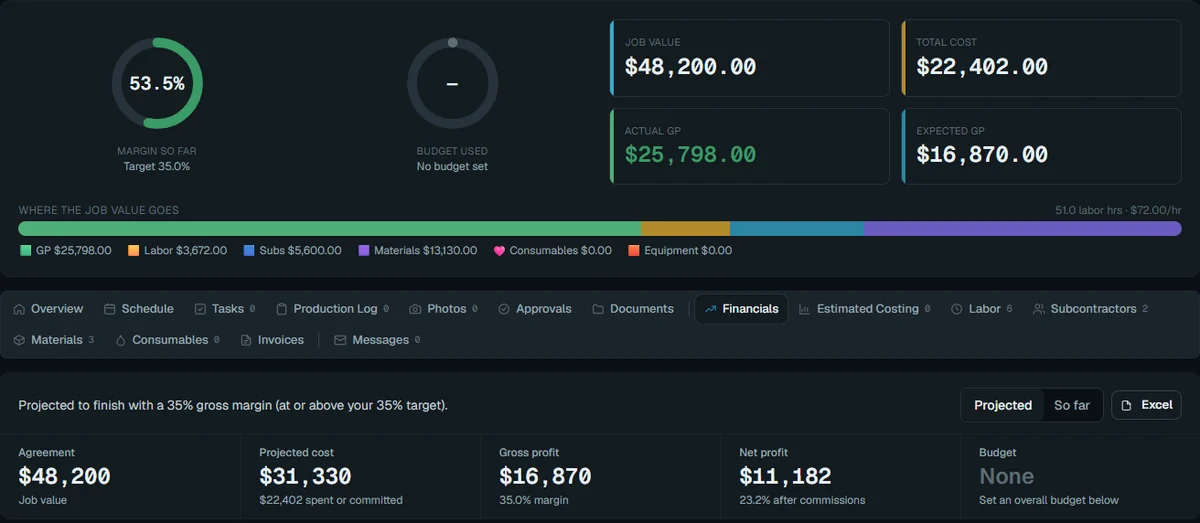
Job value, cost to date, actual and expected gross profit, and margin show as gauges at the top of every job. You see the true margin while the crew is still on site.
Labor at each person's real rate
Crews clock in to the job and switch jobs without clocking out. Every hour posts at that person's actual pay rate, and overtime follows your own rules and workweek.
A Financials tab on every job
Budget, costs and profit by group, committed and pending costs, projected final cost, labor by phase, and cash collected against cash spent. The same numbers export to Excel.
Sub bids count the day you accept
An accepted subcontractor bid hits the job's margin right away but stays out of cash spent until it's paid. You see true margin and true cash, side by side.
Real invoices, not catalog guesses
Catalog prices are estimates. Only supplier invoices post to job cost, with variance against the estimate, received quantities and shrinkage. Bills reach the job after the PM approves them.
Forecast profit before you start
Estimated costing builds the expected cost by your own spending categories to show projected margin. Offers carry a live margin too. Forecasts never touch real costs, so the books stay honest.
In the app
Real screen
See it in JobTracker.
This is the actual screen your team works in, shown here with demo company data.
JobTracker · Job costing
With JobTracker
What changes
What changes when every job shows its profit live?
Monday morning you open the job board, and the red and yellow cards show which jobs are slipping on margin, before anyone calls with bad news.
A change order gets signed by the customer, and the job's value and budget go up on their own. The extra work is paid for.
Your PM sees labor running over budget on the framing phase by Wednesday, and moves a crew before it turns into a loss.
At closeout, the Financials tab already matches what you paid. You export it to Excel for your accountant in one click.
If nothing changes
Every job you cost after the fact is a job you can't save. Without live numbers, the same overruns repeat on the next bid, and the next, until you find them at tax time.
The plan
Three steps
How do you get started?
1
Book a demo.
Thirty minutes, on work like yours.
2
We set it up with you.
We bring in your jobs, people and data, and train your crew in English or Spanish.
3
Run your next job in it.
See the difference on day one.
Works with
One system
Part of JobTracker, connected to everything else.
Get paid and pay people
Invoicing and payments for contractors →
Get paid and pay people
Bill approval and payables software →
Run the work
Materials and purchasing software →
See how it all fits together in JobTracker, our job management software for contractors →
FAQ
Straight answers
Questions about job costing.
How does JobTracker calculate job profit?
It adds up real costs as they happen. Labor posts at each person's pay rate when they clock in, approved sub bills and supplier invoices post when they arrive, and consumables, equipment and permit fees roll up too. Change orders add to the job's value. Delays carry a reason and expected resolution, so you know what a stall costs.
Can I hide costs and margins from my crew?
Yes. The "see financials" permission hides cost, margin and pay from anyone who shouldn't see them. Foremen and techs still get the schedule, scope and photos they need, without seeing what the job makes.
Does it replace my job costing spreadsheet?
Yes. Costs roll up automatically from time clock hours, approved bills, supplier invoices and field receipts, so there's nothing to type in. If your accountant still wants a spreadsheet, export the project to a styled Excel workbook.
Will my estimates mess up my actual costs?
No. Estimated costing is a forecast only. It shows projected profit and margin by your spending categories, but it never posts a cost. Only real hours, bills and invoices move the actual numbers. Use it to check a price before you sell the job, then track actuals against the budget as the work runs.
Does job costing sync with QuickBooks?
Yes. Job costs, and revenue if you choose, post to QuickBooks Online, and Wave is supported too. Your books and your job profit come from the same entries, with no double entry.
What does JobTracker cost?
Plans start at $495 a month, with a discount when you pay yearly. In the demo we'll walk through a job like yours and match the plan to the size of your team.
Get started
30-minute demo
See your real job profit in a demo
Bring a job you're worried about, and we'll show you where its money goes, from the first hour clocked to the final bill.