
JobTrackerRun every job, from the sale to payday→
Run the work
Get paid and pay people
RankLockerGet found, and see what it brings in→
Get found
Know what's working
For agencies
WeekendCRMAnswer every lead, even on the weekend→
Get the review
Software · JobTracker · Field service management
JobTracker
Field service management
Field service management software that runs the visit from booking to payment
Field service management in JobTracker is the system home-services companies use to book a visit, get the tech there, track the hours and collect the payment, all on the same job. Customers confirm with one tap and watch the truck approach on a live map. Techs clock in automatically at the job site, and the invoice goes out from the job, payable by card.
Every screen in English and Spanish · Works on phone, tablet and desktop · Plans start at $495 a month
The problem
Sound familiar?
Why do so many service visits go wrong before the tech even arrives?
The customer forgot the appointment, so nobody is home. The tech called the office for the address, then called again for the gate code. Nobody clocked in, so the hours get guessed on Friday. The invoice goes out three days later, and the payment shows up whenever the customer gets around to it.
Every one of those gaps lands on you or your office. You're the dispatcher, the reminder service and the collections department, all before lunch. It wears you down, and it shouldn't be your job to hold together a process that ought to run itself every single day.
Where it costs you today:
wasted trips to homes where nobody answers the door
hours written down from memory at the end of the week
invoices sent days after the work and paid even later
What it does
Run the field
What does field service management in JobTracker do?
Reminders customers answer with a tap
Branded confirmations, day-before reminders and reschedule notices go out by text and email. Customers confirm or ask for a different time with one tap, and the PM is told right away.
On My Way, sent by distance
The On My Way text goes out by hand or automatically by GPS distance. The customer watches the truck approach on a live map that ends when the tech arrives.
Clocked in on arrival
Pulling into a geofenced job site clocks the tech in automatically. Techs can switch jobs without clocking out, and overtime follows your own rules and workweek.
Every truck and tech on one map
See vehicles, equipment and clocked-in crew on a live map, using the phone app, a hardware GPS tracker or a manual pin. Replay where any vehicle went on any day.
The tech's whole day on one screen
My Day lists today's visits, site access, checklists, required photos and tasks. The burst camera shoots as fast as you tap and uploads the whole batch with a category.
Invoices customers pay by card
Bill from the job with catalog line items, tax and tips. Customers pay by card through Stripe on a branded page, and reminders and late fees run automatically.
In the app
Real screen
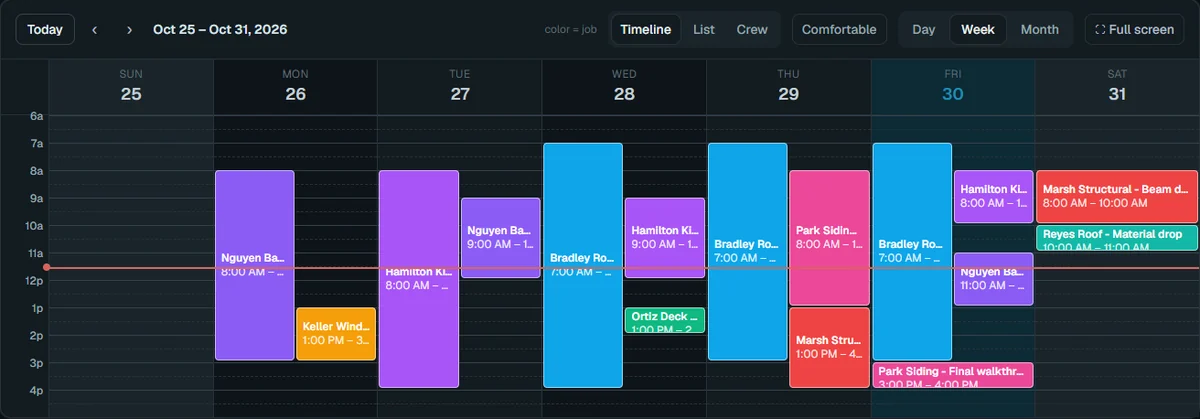
See it in JobTracker.
This is the actual screen your team works in, shown here with demo company data.
JobTracker · Field service management
With JobTracker
What changes
What does a service day look like when the system runs it?
The night before, every customer gets a branded reminder. They tap to confirm, one asks for a later time, and the PM sees it before the trucks roll.
When the tech gets close, the On My Way text goes out on its own. The homeowner watches the truck turn onto the street and has the gate open.
The tech pulls into the driveway and is clocked in to the job automatically. The gate code, checklist and required photos are already on their phone.
The work is done, the invoice goes out from the job, and the customer pays by card from the portal. The payment alert lands on your phone.
If nothing changes
Every no-show trip, guessed timesheet and late invoice costs you a little. Across a full week of visits, those little costs add up to real money and real hours you never get back.
The plan
Three steps
How do you get started?
1
Book a demo.
Thirty minutes, on work like yours.
2
We set it up with you.
We bring in your jobs, people and data, and train your crew in English or Spanish.
3
Run your next job in it.
See the difference on day one.
Works with
One system
Part of JobTracker, connected to everything else.
Run the work
Scheduling and dispatch software →
Run the field
Time clock and time tracking app →
Get paid and pay people
Invoicing and payments for contractors →
See how it all fits together in JobTracker, our job management software for contractors →
FAQ
Straight answers
Questions about field service management.
Do techs have to remember to clock in?
No. When a tech arrives at a geofenced job site, JobTracker clocks them in to that job automatically. A missed punch can still be fixed with a time correction that keeps a proper approval trail.
Do you track my crew after hours?
No. A person's location shows only while they're clocked in and have opted in. Each person's location history stays admin-only, while a vehicle's route can be replayed for any day.
Do I need to buy GPS trackers?
No. Vehicles, equipment and people can show on the map from the phone app, a hardware GPS tracker or a manual pin, so you can start on whatever budget you have. Add hardware trackers later if you want them on the trucks.
Can customers pay online by card?
Yes. Customers pay by card through Stripe on a branded payment page, and the money goes to your own account. Cash, check and bank payments can be recorded by hand, and a processing fee can be passed through where your state allows it.
Does it handle recurring service work?
Yes. Set a job to repeat weekly, monthly or on another cycle, and each visit starts with a fresh checklist. Weekly or monthly service can be billed automatically with recurring invoices, which suits pool, cleaning and lawn routes.
How much does it cost?
Plans start at $495 a month, and you save with a discount when you pay yearly. In the demo we'll walk a service day like yours through JobTracker, from reminder to payment, so you can judge it on your own work.
Get started
30-minute demo
Run tomorrow's service day without the phone calls
Book a demo and we'll walk one of your real service visits from reminder to card payment in JobTracker.