
JobTrackerRun every job, from the sale to payday→
Run the work
Get paid and pay people
RankLockerGet found, and see what it brings in→
Get found
Know what's working
For agencies
WeekendCRMAnswer every lead, even on the weekend→
Get the review
Software · JobTracker · English and Spanish
JobTracker
English and Spanish
A construction app in Spanish your whole crew can actually use
Bilingual JobTracker is a construction app that works fully in Spanish and English. Each person picks their language with one tap and every screen switches: the field app, the time clock, the office screens, the subcontractor portal and the customer portal. Customers and subs who prefer Spanish also get their emails, texts, appointment pages and invoices in Spanish.
Every screen in English and Spanish · Works on phone, tablet and desktop · Plans start at $495 a month
The problem
Sound familiar?
Is your best crew working from screens they can't fully read?
Your foreman reads English fine, but half the crew doesn't, so he translates everything: the checklist, the photo list, the clock-in screen, the notes from the office. When he's off, things get missed. English-only apps get ignored, and the job runs on phone calls and pictures of handwritten notes again.
It isn't a language problem, it's a respect problem. Good people feel slow and second-guessed in software that wasn't built for them, so they stop using it. You lose the details only they know, and the office ends up chasing answers the crew would have logged in their own language.
Where it costs you today:
the foreman's whole morning spent translating the day's instructions
steps skipped because the checklist was in a language nobody read
customers who speak Spanish calling the office because every update came in English
What it does
Run the field
What does bilingual JobTracker do?
One tap, every screen switches
Each person picks English or Spanish for themselves, and every screen follows. A crew member works in Spanish while the office works in English on the same job, at the same time.
My Day in their language
Today's visits, site access notes, checklists, required photos, the burst camera and daily logs all show in Spanish for the people who chose it. The crew knows the plan without a translator.
Clock in without asking for help
Job clock-in, geofenced automatic clock-in, overtime and time off requests all work in Spanish. Hours still land on the right job, whichever language the person uses.
A subcontractor portal in Spanish
Subs who prefer Spanish see their bids, documents, schedule, photos and invoices in Spanish, and get their emails and texts that way too. Fewer calls to your office asking what a screen means or where to upload a document.
Customers hear from you in Spanish
Customers who prefer Spanish get their portal, emails, texts, appointment pages and invoices in Spanish. The live project tracker, phase photos, approvals and online payment all show in their language.
Office screens switch too
The office side of JobTracker is bilingual as well. A bilingual office manager can schedule and order in Spanish while the owner reviews the same jobs in English.
In the app
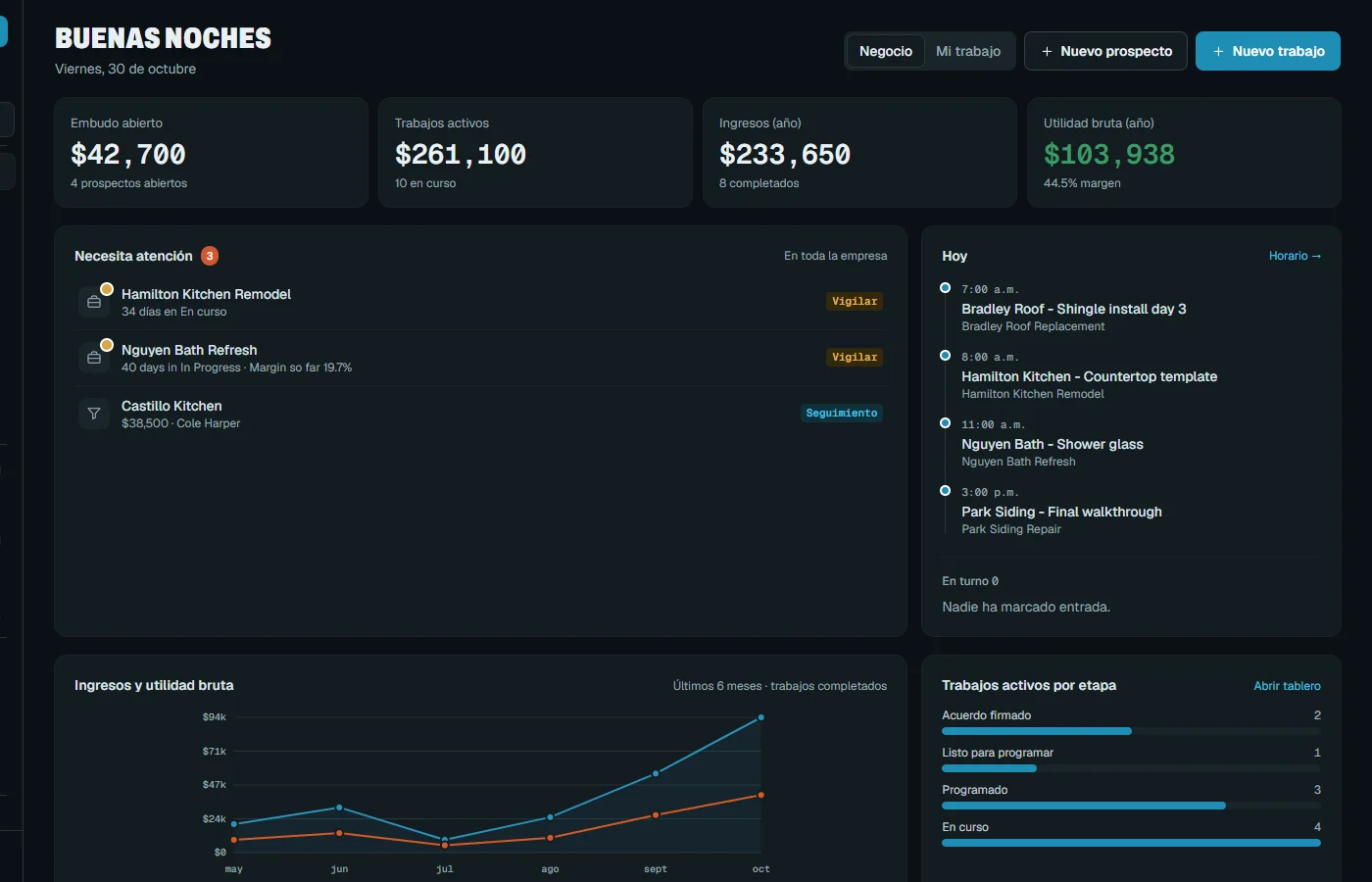
Real screen
See it in JobTracker.
This is the actual screen your team works in, shown here with demo company data.
JobTracker · English and Spanish
With JobTracker
What changes
What changes when the app speaks your crew's language?
At 6:45 the crew opens My Day in Spanish and sees the visit, the gate code note and the photos the phase needs, without the foreman reading it out loud.
A helper who started last week clocks in on his own phone, picks the job and gets to work. Nobody has to walk him through an English screen.
A Spanish-speaking homeowner gets the appointment page and the invoice in Spanish, pays online from the portal, and doesn't need to call to ask what a line means.
That evening you review the same job in English: the photos, the hours and the daily log the crew filled out in Spanish, all on one job record.
If nothing changes
When the app only speaks English, the people doing the work stop using it, and the record goes back to texts and memory. That's where missed steps, wrong hours and rework start, and it's the crew that knows the most who goes quiet first.
The plan
Three steps
How do you get started?
1
Book a demo.
Thirty minutes, on work like yours.
2
We set it up with you.
We bring in your jobs, people and data, and train your crew in English or Spanish.
3
Run your next job in it.
See the difference on day one.
Works with
One system
Part of JobTracker, connected to everything else.
Get paid and pay people
Customer portal and communication →
Run the field
Time clock and time tracking app →
Run the field
Jobsite photo documentation app →
See how it all fits together in JobTracker, our job management software for contractors →
FAQ
Straight answers
Questions about english and spanish.
Is it really every screen, or just the field app?
It's every screen. The field app, the office screens, the subcontractor portal and the customer portal all switch, and each person picks their own language with one tap. It's been live across all of them since October 2026.
Does the language change for everyone at once?
No. Language is set per person. Your foreman can work in Spanish while your office manager works in English, on the same job at the same time, and neither one changes the other's screens.
Do customers get texts and emails in Spanish?
Yes. Customers and subcontractors who prefer Spanish get their emails, texts, appointment pages and invoices in Spanish, not just the portal screens. Each message follows that person's own language setting.
Is anything still English only?
Yes, two things. The help-center articles and the AI answers are still in English. Everything your crew, subs and customers work in day to day, from the time clock to the invoice, switches to Spanish for anyone who picks it.
Do my crews need a different app for Spanish?
No. It's the same JobTracker app on their phone. They pick Spanish once, and the time clock, camera, checklists, required photos and daily logs all switch with it. Nobody has to install or learn a second app.
How much does it cost?
Plans start at $495 a month, with a discount when you pay yearly. Spanish is built into JobTracker, not a separate product, so each person on your account can choose it for themselves, from the newest helper to the office manager.
Get started
30-minute demo
Give your crew an app in their language
Book a demo and we'll switch the screens to Spanish in front of you, from the crew's phone to the customer's portal.