
JobTrackerRun every job, from the sale to payday→
Run the work
Get paid and pay people
RankLockerGet found, and see what it brings in→
Get found
Know what's working
For agencies
WeekendCRMAnswer every lead, even on the weekend→
Get the review
Software · JobTracker · Construction project management
JobTracker
Construction project management
Construction project management software that shows what's blocking every phase
Construction project management in JobTracker is a Plan Gantt, materials, subcontractors, permits and job costing working from one project record. Remodelers and builders see every phase and subphase with its dates, crew, deliveries and permit status, and what a late item will push back. Subs bid and upload compliance documents in their own portal, and the customer follows a live tracker.
Every screen in English and Spanish · Works on phone, tablet and desktop · Plans start at $495 a month
The problem
Sound familiar?
What happens to the rest of the project when one piece runs late?
A cabinet delivery slips a week. The countertop template can't happen, so the plumber's date is wrong, so the tile crew shows up to a room that isn't ready. Meanwhile the permit is stuck in engineering, a sub's insurance quietly expired, and the homeowner still hasn't picked a faucet.
On a big project you're managing dominoes, and most of them stay invisible until they fall. You spend nights re-checking dates in three places, afraid you missed one. You bid the job right. It's the gaps between the trades that eat the margin, and you find out at closeout.
Where it costs you today:
crews scheduled into a phase that's still waiting on materials
an accepted sub bid nobody counted against the job's margin
a permit stuck in one stage while the schedule assumes it's approved
What it does
Run the work
What does construction project management in JobTracker do?
The whole project on one Gantt
The Plan Gantt lays out every phase and subphase with dates, status, assignees and materials, zooming from days to months. Late deliveries are drawn right against the phase they block.
Phases with their own scope
Break a project into internal and subcontracted phases, each with its own scope of work. Weather for 16 days sits on the calendar, so exterior phases don't get booked into a storm.
Materials planned by phase
Build a bill of materials for each phase with estimated costs, then generate the order. The delivery schedule sorts every expected drop as past due, today, next 7 days or later.
Subs who bid and stay compliant
Request bids from several subs and compare them against your internal budget. License, insurance and W-9 are tracked with expiry dates, and an expired copy no longer counts.
Permits and engineering on one board
Each permit moves through its stages, including Engineering, with days-in-stage and aging alerts. Turnaround history by authority tells you how long each office really takes.
Readiness and quality checks
A readiness checklist warns you before you confirm work that's missing permits or materials. QC checkpoints are pass or fail with a photo, and a failure creates a fix-it task.
In the app
Real screen
See it in JobTracker.
This is the actual screen your team works in, shown here with demo company data.
JobTracker · Construction project management
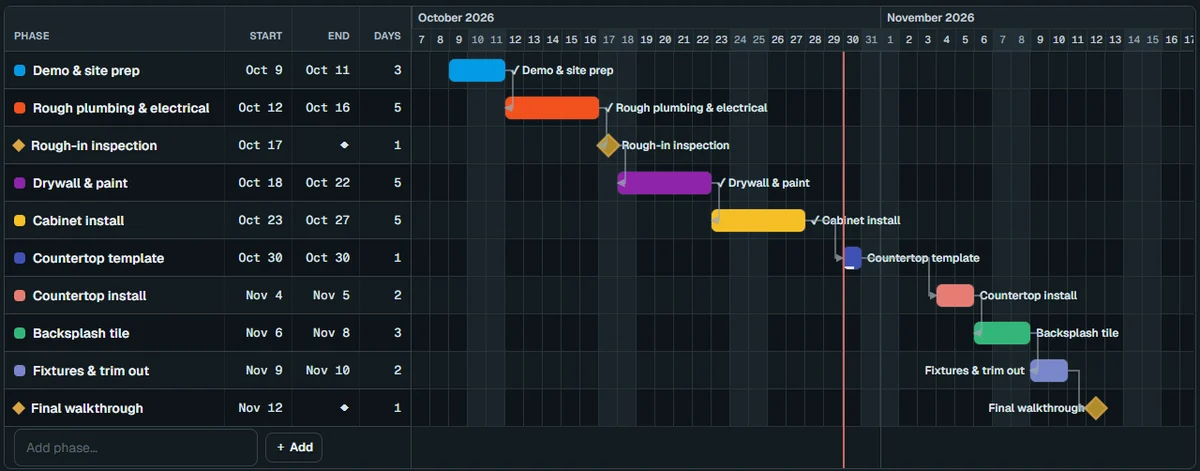
With JobTracker
What changes
What does it feel like when every phase shows its blockers?
The Gantt shows the cabinet delivery running late against the install phase. You move that phase and everything after it, and crew, subs and the customer get one update.
The electrician uploads a new insurance certificate in the subcontractor portal. The approval gate clears, and nobody in your office had to chase the paperwork.
The homeowner picks a tile in the portal from the selection request you sent. Once you confirm it, the choice drops into the project's materials list.
You accept the drywall bid, and it counts against the margin right away. The Financials tab shows the projected final cost while the job is still mid-build.
If nothing changes
A project without a connected plan doesn't fail all at once. It loses a day here and a few points of margin there, and you see the total at closeout, when nothing can be changed.
The plan
Three steps
How do you get started?
1
Book a demo.
Thirty minutes, on work like yours.
2
We set it up with you.
We bring in your jobs, people and data, and train your crew in English or Spanish.
3
Run your next job in it.
See the difference on day one.
Works with
One system
Part of JobTracker, connected to everything else.
Run the work
Permit tracking software →
Run the work
Materials and purchasing software →
Run the work
Vendor and subcontractor management software →
See how it all fits together in JobTracker, our job management software for contractors →
FAQ
Straight answers
Questions about construction project management.
Can it handle phases my subcontractors run?
Yes. Any phase or subphase can be subcontracted with its own scope. In their own portal, subs see their schedule, submit bids with attachments, upload job-site photos, send invoices and follow a live payment tracker.
Will I know what the project will really cost before it's finished?
Yes. The Financials tab shows committed and pending costs and a projected final cost. An accepted sub bid counts against margin right away, and a signed change order adds to the job's value and budget.
How do I spot which projects need attention?
The job board tells you. Each card turns green, yellow or red from rules you set per column, like cost against budget and days in stage, and health badges list the reasons so you know where to look first.
Will the homeowner see my costs or suppliers?
No. The portal shows delivery days and windows, never prices or suppliers, and only the photos you choose to share. Phase QR codes posted on site show the scope without prices or customer details, so anyone on site can check the work without seeing the money.
Can I load my supplier's prices?
Yes. Import a supplier price list from CSV into the product database, and price-age warnings tell you when a number is getting old. Only supplier invoices post to job costing, so costs match what you actually paid.
What does it cost?
Plans start at $495 a month, with a discount when you pay yearly. Bring a current project to the demo and we'll lay it out in the Plan Gantt with you, phase by phase, so you can see your own job in it.
Get started
30-minute demo
See your next project's blockers before they cost you
Book a demo and we'll set up one of your current projects in JobTracker, with phases, materials, subs and permits included.