
JobTracker
Job management software for contractors
Know every job is making money while you can still do something about it.
JobTracker is job management software for home-services and construction companies. It runs the whole life of a job in one place: the sale, the schedule, the crew, materials, permits, subcontractors, job costing, customer updates, invoicing and commissions. You see the real profit on every job while it's still running, in English or Spanish, on any device.
Built inside working trades companies · Every screen in English and Spanish · $199 a month for 5 users
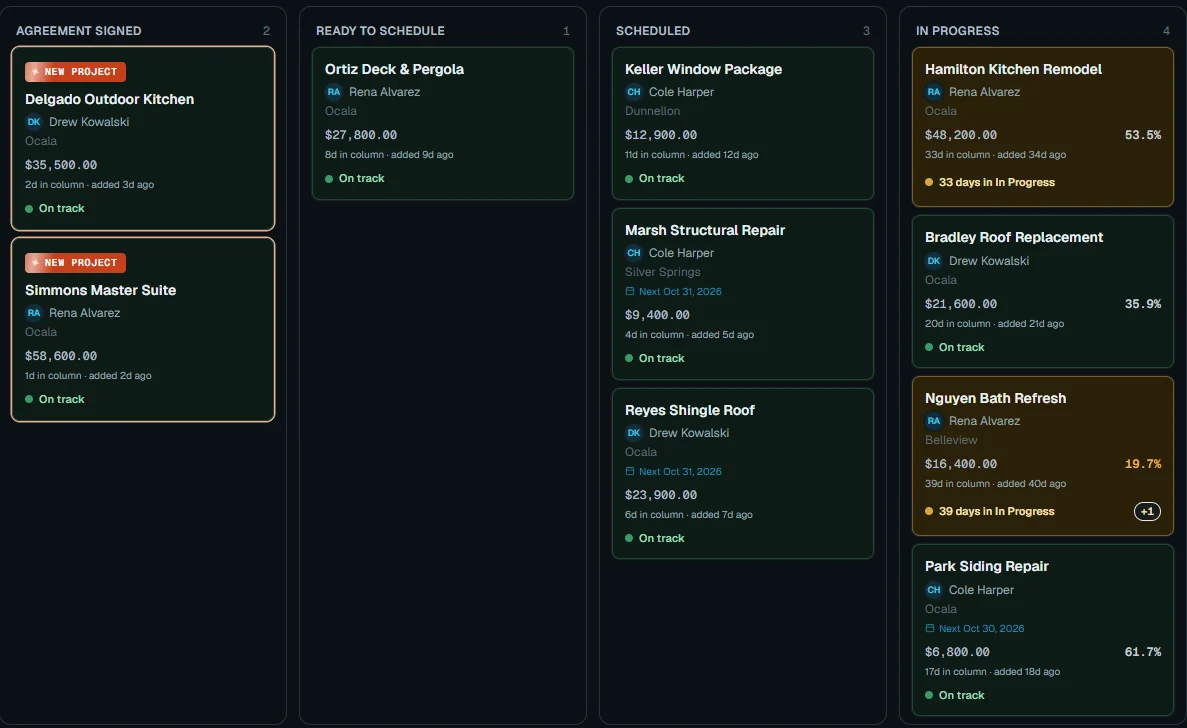
JobTracker · Job board
Search jobs, customers, tasks…
The problem
Sound familiar?
Why do you only find out a job lost money after it's finished?
Because the job lives in five places, and none of them talk to each other. So you become the system: the one who remembers every callback, every expired insurance card and every job that's quietly slipping.
Today · five apps, five leaks
The CRM
Change order never signed
A calendar
Crew booked on the wrong job
A group text
Nobody saw the schedule change
A spreadsheet
Costs a week behind
Receipts in the truck
Sub bill paid before anyone checked it
You didn't start a company to babysit software that doesn't talk to itself.
With JobTracker · one place
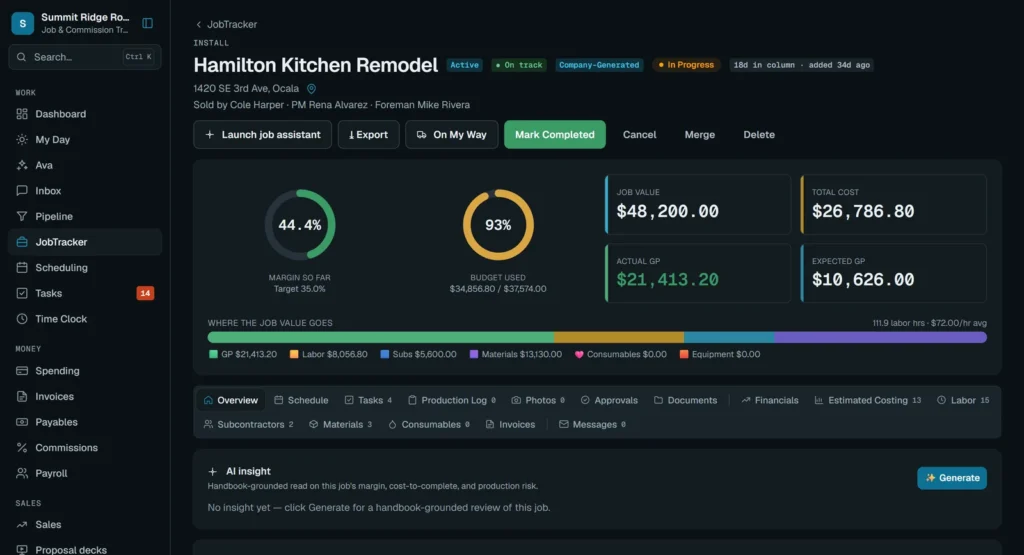
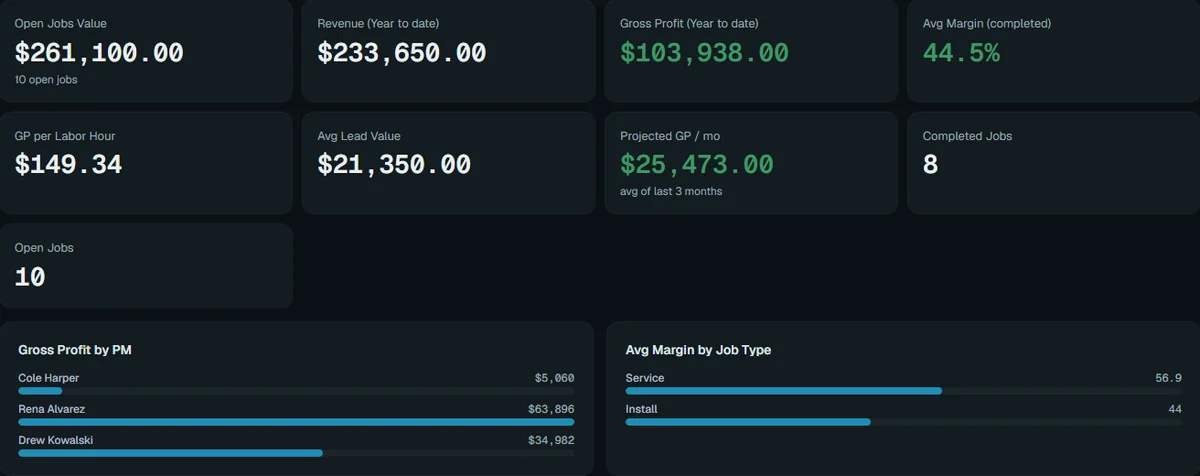
Every number on the job, live, while there's still time to act.
Margin so far, budget used and where every dollar goes, updated as your crew clocks in and the bills come in. Shown here with demo company data.
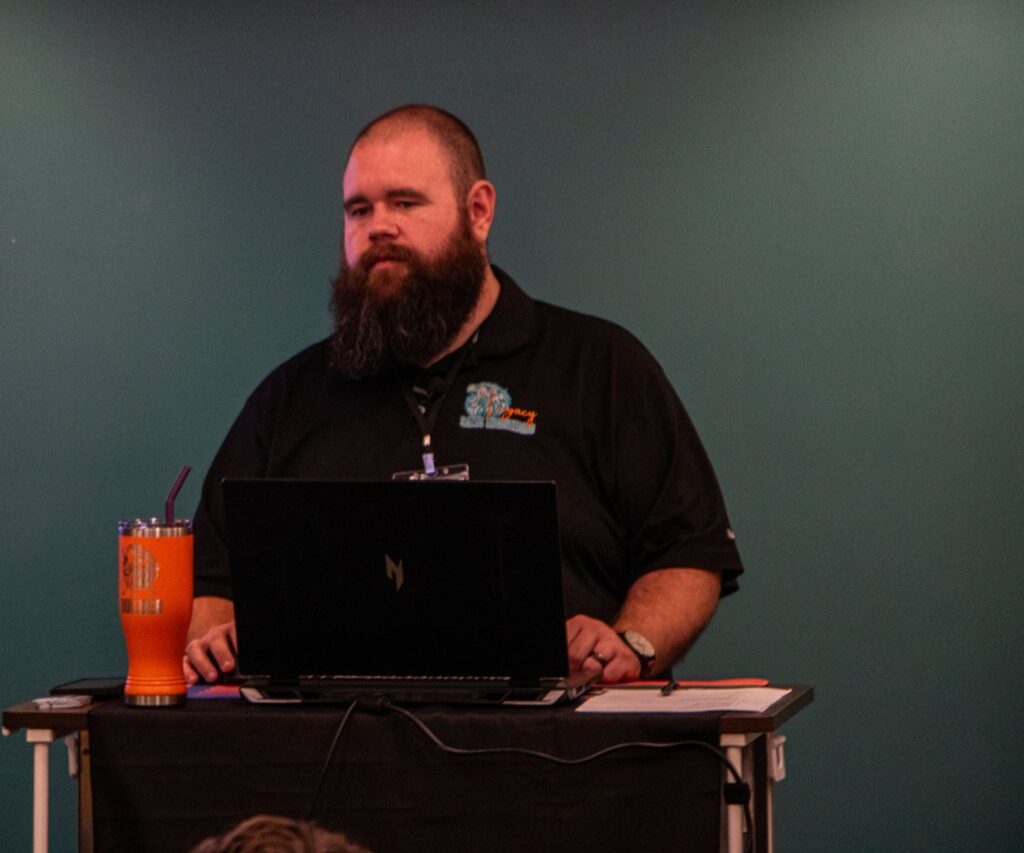
Shawn teaching a sales workshop for trades owners
“The sale was never the hard part. Keeping everything straight after the customer said yes was. So we built the system I wish every one of those owners had.”

Founder, Legacy Builder Applications
Who built it
From the field
Built by people who sell and build for a living.
We spent years teaching trades companies how to sell, and kept watching good companies lose money after the sale: the handoff to the office, the schedule, the crew, the costs, the payday. JobTracker was built inside working remodeling and repair companies to close those gaps, one real problem at a time.
EN + ES
Every screen, portal, email and text, picked per person
2 portals
Customer and subcontractor portals, under your brand
135
Help articles, kept current with every feature
Oct 2026
Full security review, every finding fixed
The plan
Three steps
How do you get from five apps to one?
Users
− 5 +
Subcontractors
− 10 +
Monthly
$199
1
Pick your team size.
One plan: $199 a month for 5 users and 10 subcontractors. Add users at $50 and subcontractors at $5 a month.
Pay the first month with Stripe
↓
Set your password
↓
You're inside JobTracker
2
Pay and get your login.
Pay the first month and set your password. Want us to import your data and train your crew? Add setup and import.
3
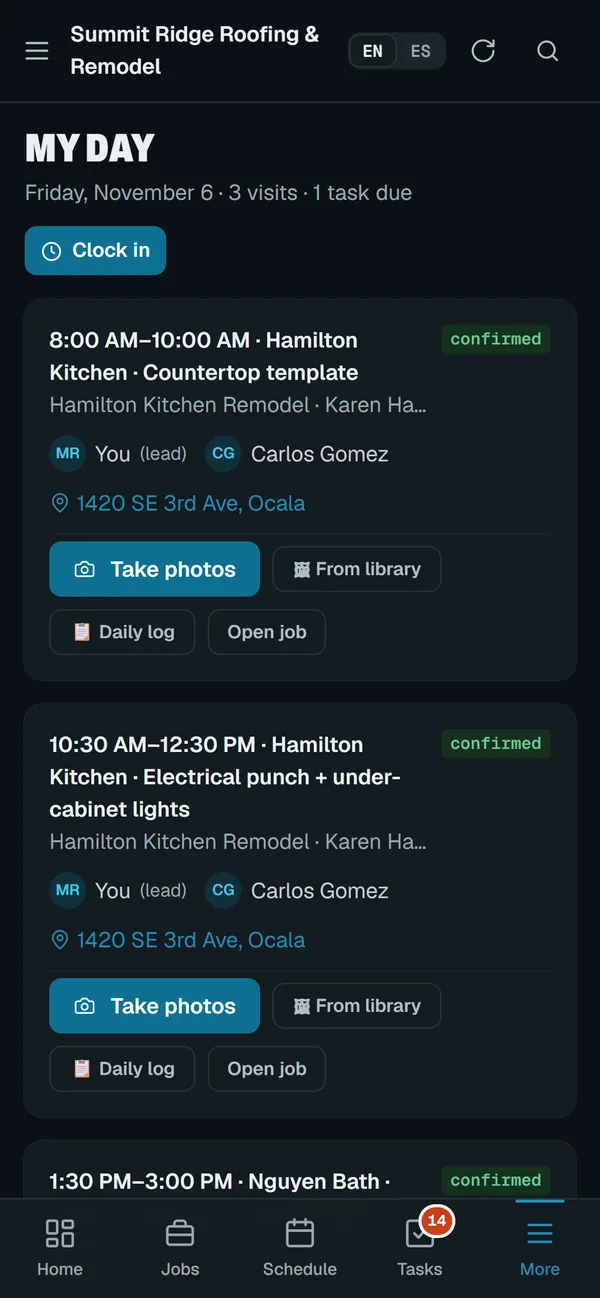
Run your next job in it.
Your crew opens My Day on their phones, and you see the profit on day one, not three weeks after it's done.
What's inside
22 tools, one system
Everything a job needs, in one place. Start where it hurts.
Each tool works on its own. Together they're one system, so nothing gets typed twice.
3 tools
Sell the job
Close it at the kitchen table.
7 tools
Run the work
Every job, every phase, one board.
5 tools
Run the field
Crews, trucks and hours, tracked.
4 tools
Get paid and pay people
Money in, bills out, profit live.
3 tools
Lead the company
Know what needs you today.
Real screens
Demo company data
See the screens your team will use.
This is JobTracker as it runs today, in dark mode, filled with a demo company's jobs and crew.
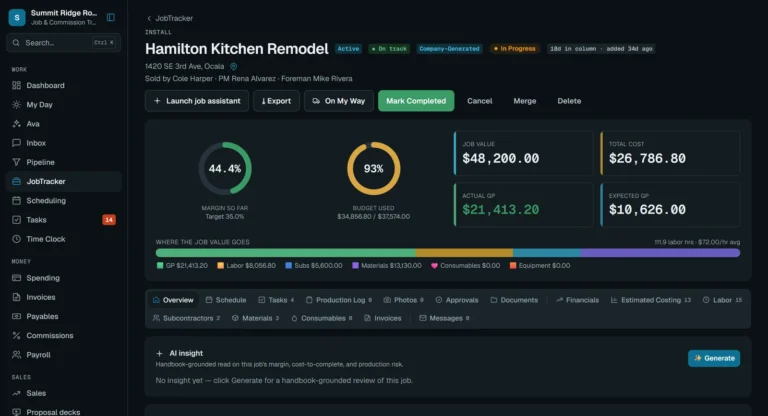
Live profit on every job
Margin so far, budget used and where every dollar of the job goes.
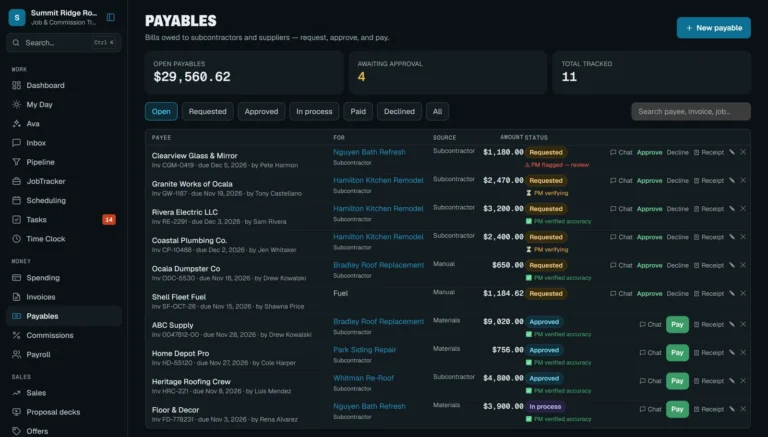
Bills checked before they're paid
Sub and supplier bills, verified by the PM and paid from one queue.
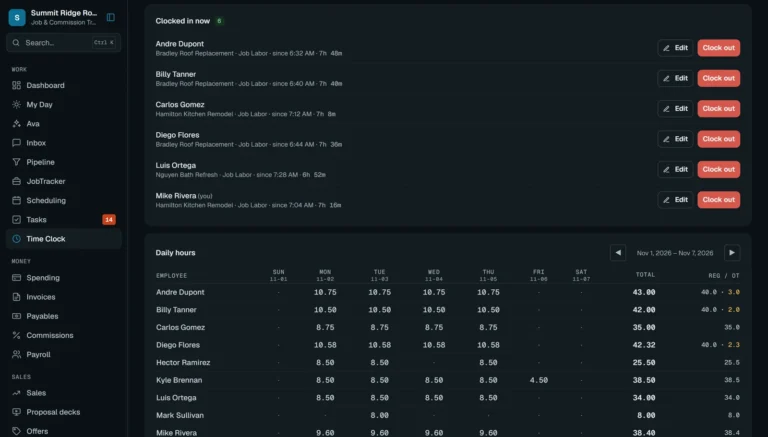
Who's working, and on what
Crews clocked in right now, with regular and overtime hours for the week.
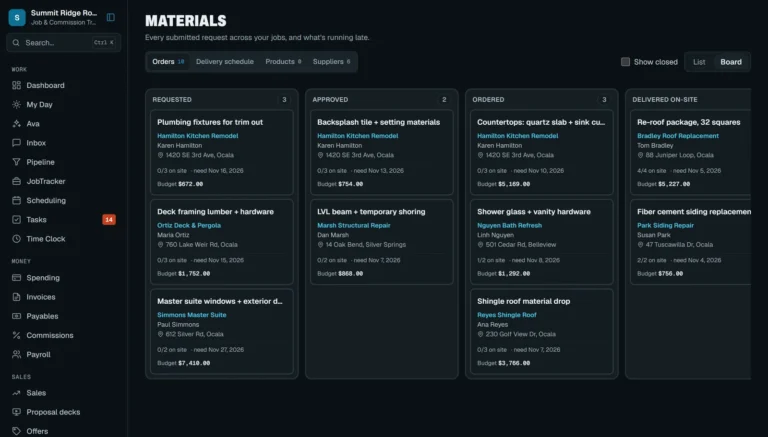
Materials by job and phase
Requested, approved, ordered and delivered, so nothing holds up the crew.
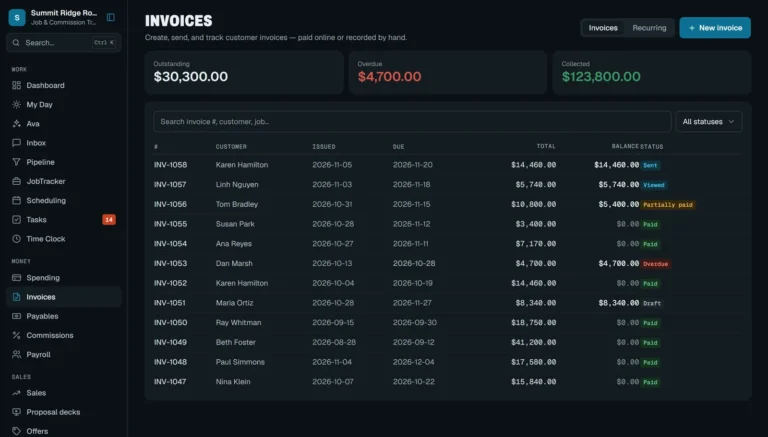
Know what's owed to you
Outstanding, overdue and collected at a glance, invoice by invoice.
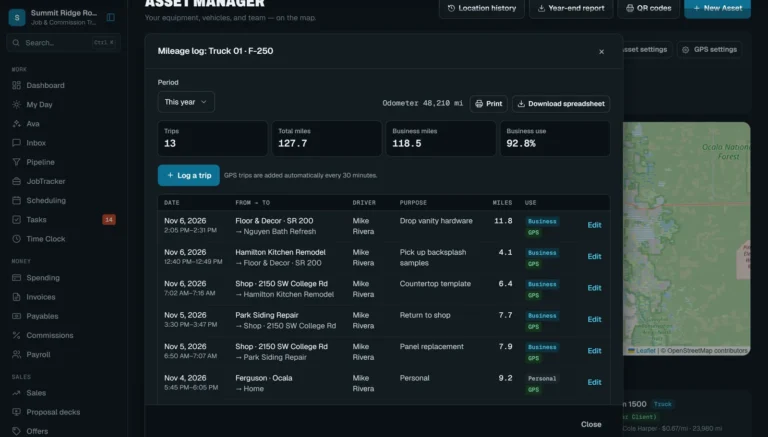
Every truck, every mile
Trips tied to jobs, with business use worked out for tax time.
With JobTracker
A normal day
What does a normal Tuesday look like with JobTracker?
6:45 a.m. Your crew opens My Day on their phones, in Spanish. Today's visits, gate codes, the scope and the photos they owe you are already there.
8:10 a.m. A crew member arrives on site and is clocked in to the right job automatically.
10:30 a.m. The homeowner approves a change order from their portal. It's added to the job's value and budget before lunch.
1:15 p.m. A sub uploads a new insurance certificate. Nobody in the office had to chase it.
3:40 p.m. A supplier bill comes in. The PM approves it from their phone; payables pays it.
5:30 p.m. The end-of-day email lands: hours, costs, late starts and the margin on every open job.
You go home knowing which jobs made money today. Nobody had to call you to find out.
The choice
Where this goes
What does another season of “we'll figure it out” cost?
Without one system
Another job closes a few points under where you bid it, and you find out in the books a month later. Commission fights on payday. A crew double-booked because two people kept two calendars. Customers calling the office for updates you don't have.
With JobTracker
You start every morning knowing which jobs are making money and what needs you. The crew knows what to do, customers know where things stand, and payday is right the first time.
Pricing
One plan
Every tool. One simple price.
One plan: $199 a month for 5 users and 10 subcontractors. Each extra user is $50 a month and each extra subcontractor is $5 a month. Every tool is included, and you can change your team size any time. Want us to do the setup? Add setup and import for $1,499 one time: we bring in your customers, jobs and subs and train your crew.
Integrations
Keep what works
Keep GoHighLevel, QuickBooks and the tools you already trust.

GoHighLevel

QuickBooks Online

Wave
Gusto
Stripe
Google Calendar
Google Drive
Claude
ChatGPT
n8n
FAQ
Straight answers
What owners ask before they switch.
Will my crew actually use it?
Yes, because it's built for a phone and for the way crews work. My Day shows only today's visits, the scope and the photos they owe you, in English or Spanish, and clocking in can happen automatically when they arrive on site.
Do I have to switch everything at once?
No. Start with the part that hurts most, like scheduling or job costing, and turn on the rest when you're ready. Menu access is set per person, so each role only sees what it needs.
Can I keep GoHighLevel and QuickBooks?
Yes. Signed contracts and won deals in GoHighLevel become jobs automatically, and job costs post to QuickBooks Online. Wave is supported too.
How much does JobTracker cost?
JobTracker is one plan: $199 a month for 5 users and 10 subcontractors. Each extra user is $50 a month and each extra subcontractor is $5 a month. Book a demo and we'll show it working on a team like yours.
How does it know my real profit?
Labor posts at each person's actual pay rate as they clock in. Sub bills, materials, equipment time and permit fees post as they happen, and signed change orders add to the job's value and budget.
Can I hide costs and margins from my crew?
Yes. The "see financials" permission hides cost, margin and pay from anyone who shouldn't see them.
Will AI ever text my customers on its own?
No. The AI Assistant reads back every action and waits for your yes, and any text or email to a customer through the AI connection waits for a person on your team to approve it.
Can I run more than one company?
Yes. One login covers every business you own, with a switcher between them.

Get started
30-minute demo
See your jobs running in JobTracker.
Book a 30-minute demo on work like yours. Bring the job that keeps you up at night.